

Every year, music lovers eagerly wait for one thing—the chance to look back at their listening habits. Whether you’re a devoted Swiftie, a hip-hop enthusiast following every Kendrick vs. Drake diss track, or someone who spends nights discovering indie artists, an annual wrap-up feels like a digital diary of your musical moods.
For Apple users, that nostalgia-filled moment is called Apple Music Replay.
As Apple Music’s answer to the massively popular Spotify Wrapped, the Replay experience highlights the songs, artists, albums, and genres you listened to the most throughout the year. And just like clockwork, Apple Music Replay 2025 dropped on December 2, bringing with it a burst of excitement across social media.
In this blog, we break down everything you need to know about Apple Music Replay, its release date, how it works, and—most importantly—how to view your own Replay report.
What Is Apple Music Replay?
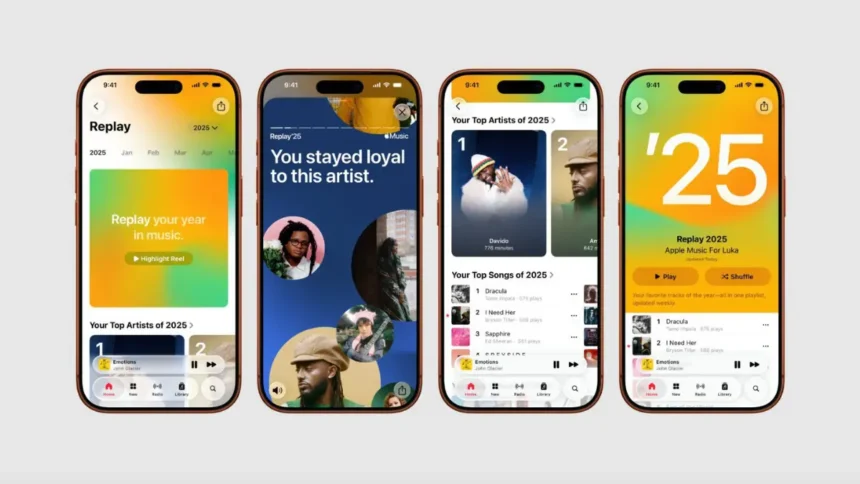
Apple Music Replay is an annual listening summary that gives subscribers a personalized look back at their music habits for the year. Think of it as a colorful, interactive snapshot that showcases:
Replay originally launched in 2019 as a weekly updating playlist. It wasn’t until 2022 that Apple transformed it into a full interactive experience—similar to Spotify Wrapped—offering visual stories, summaries, and shareable graphics.
More Read

But what sets Replay apart is that you can view your stats year-round. Unlike Spotify Wrapped, which drops once annually, Apple Music updates your Replay playlist weekly, allowing you to monitor your listening behavior as the year progresses.
Apple Music Replay 2025 Release Date
Apple traditionally stays quiet about the exact launch date of Replay each year. But Replay 2025 has finally arrived.
🗓 Apple Music Replay 2025 Release Date:
Tuesday, December 2, 2025
This aligns with previous drop timelines:
Apple always releases Replay toward the end of November or early December, giving users a sneak peek at their year-long listening journey before the new year kicks in.
Why Apple Music Replay Matters
Music is deeply personal, and year-end summaries offer a fun, nostalgic way to remember the soundtrack of your year—whether it involved heartbreak, new adventures, gym motivation, road trips, or peaceful night playlists.
In 2024, artists like Kendrick Lamar, Drake, Sabrina Carpenter, Shaboozey, Taylor Swift, Benson Boone, and Teddy Swims topped Apple Music global Replay charts. And 2025 is expected to bring another exciting set of top-tier names based on fans’ listening habits.
Replay makes it easy to celebrate your favorite artists and even discover new patterns you didn’t realize about your music taste.
How Apple Music Replay Works
Apple Music Replay breaks down your listens from January through December, creating a report based on:
But here’s something most users don’t know:
Apple Music starts calculating Replay data from February
This means your very early January streaming may not fully reflect in your final Replay. However, everything from February onward helps build your final report.
The moment December arrives, Apple generates the complete Replay Experience, which includes interactive pages, animations, and shareable cards designed for social platforms.
How to Check Your Apple Music Replay on iPhone
If you’re using an iPhone or any Apple device with the Music app, accessing Replay is simple.
Step-by-Step Guide:
- Open the Apple Music app
- Go to the Home tab
- Scroll until you see “Replay: Your Year in Review”
- Tap the Replay card to enter the full interactive experience
- Swipe through your stats to see your artists, songs, albums & minutes
- Download or share your summary cards with friends or on social media
Apple has designed Replay to blend seamlessly into the app, so you don’t need to dig around menus or settings.
How to Access Apple Music Replay Without an iPhone
Not everyone uses an iPhone—but the good news is you don’t need one to check your Replay.
Apple Music Replay is available on any device through a browser.
To view your Replay online:
👉 Visit replay.music.apple.com
👉 Sign in with your Apple ID
Once logged in, you’ll see:
No Apple device required.
Features of Apple Music Replay 2025
Apple Music Replay 2025 comes with a polished design and updated visual storytelling. Here’s what users can expect:
1. Total Minutes Listened
Get the exact number of minutes spent listening to music this year. For many users, this can go into the tens of thousands.
2. Top Songs
Replay highlights your top tracks based on total plays. You can see how often you looped that one breakup song or workout anthem.
3. Top Artists
The report ranks your most-played artists and shows how many hours you spent listening to each.
4. Top Albums
Apple Music also highlights your top albums—even if you only listened to a few of their tracks repeatedly.
5. Genre Breakdown
See which genres dominated your music habits this year—pop, hip-hop, indie, EDM, country, or classical.
6. Shareable Cards
Replay includes beautiful visual cards that are perfect for sharing on:
These cards help users show off their music personality to the world.
What’s New in Apple Music Replay 2025?
While Apple keeps the features subtle and clean, Replay 2025 includes:
Apple also continues refining how Replay calculates your stats, ensuring greater accuracy and consistency.
Apple Music Replay vs Spotify Wrapped – A Quick Comparison
Both platforms offer fantastic year-end summaries, but here’s how Replay stands out:
| Feature | Apple Music Replay | Spotify Wrapped |
|---|---|---|
| Released | Late Nov–Dec | Early Dec |
| View Anytime | ✔ Yes (year-round) | ✘ No |
| Available on Web | ✔ Yes | ✔ Yes |
| Weekly Playlist Updates | ✔ Yes | ✘ No |
| Visual Stories | ✔ Yes | ✔ Yes |
Overall, Spotify focuses on fun, trendy visuals, while Apple keeps Replay clean, elegant, and data-driven.
Why Users Love Apple Music Replay
People look forward to Replay for many reasons:
Replay is more than just data—it’s a reflection of your emotions, vibes, and soundtrack of the year.
How to Share Your Apple Music Replay
Replay cards are designed for sharing. To share:
- Open Replay on the Music app or browser
- Tap Share on any stat card
- Select your platform (Instagram, X, Threads, WhatsApp)
- Post the card with a caption
For creators and influencers, this is a powerful way to engage followers and start conversations about music.
👉 Also Read: Best Black Friday Apple AirPods & Headphone Deals 2025.
Final Thoughts
Apple Music Replay has grown tremendously since its early years. With its 2025 launch, Apple continues giving users a clean, data-rich, and beautifully designed summary of their musical year.
From the hits that defined your mood to the artists you played on repeat, Replay brings your entire year of sound into a single, shareable experience.
If you haven’t checked yours yet—now is the time. Whether you’re team Apple Music or Spotify, there’s something magical about revisiting the songs that shaped your 2025.